Musings from a lean stack: Your users pay for every kilobyte you forget about
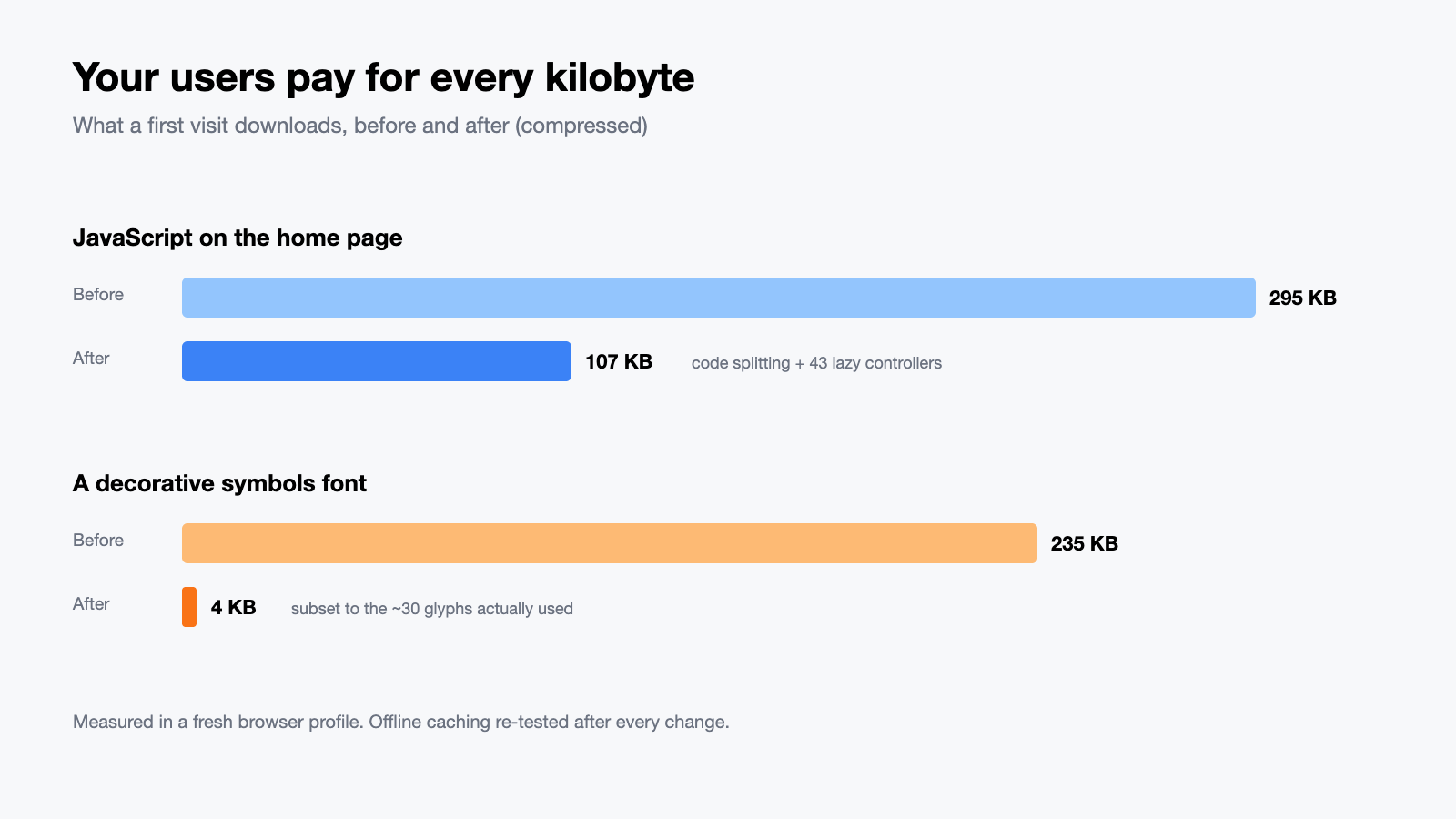
On slow, expensive mobile data, first-visit weight is a cost your users carry. Code splitting took the home page from 295 KB to 107 KB of JavaScript, and subsetting one decorative font took it from 235 KB to 4 KB.
Part 3 of 5 in the series **Musings from a lean stack: notes from building and running software alone, on one server and a small budget.
Many of the people who use my apps are in Nigeria and nearby, often on mobile data that is slow, expensive, or both. Every kilobyte I send on the first visit is a kilobyte they pay for before they see anything. This week I went looking for kilobytes I'd forgotten about. I found a lot of them.
Measure what the browser actually downloads
Before changing anything, I opened the home page in a fresh browser profile and listed every file it downloaded, with sizes. Two things stood out:
- One JavaScript bundle of about 1.15 MB raw (295 KB compressed), holding every feature the app has: the projector, the presentation console, file importers, the offline Bible engine and more. Most visitors only read.
- A 235 KB font file downloaded on almost every page, from a symbols font I'd added for a handful of decorative characters.
Neither showed up as a problem in development on fast Wi-Fi. Both cost real seconds on a phone in Lagos.
Split the code by what people actually use
The app uses esbuild with ES modules, so code splitting is mostly a switch plus a decision about what loads lazily. The build becomes something like:
esbuild app/javascript/application.js \
  --bundle --splitting --format=esm --minify --sourcemap \
  --outdir=app/assets/builds \
  --entry-names=[name] \
  --chunk-names=chunks/[name]-[hash].digested
The .digested suffix matters on Rails with Propshaft: it tells the asset pipeline the file name already contains a hash, so it serves the chunk as-is and imports between chunks keep working after a deploy.
Then I changed heavy Stimulus controllers to load the first time a page uses them, instead of registering everything up front. A simple version of the idea:
// lazy_controllers.js: register heavy controllers on first use
const lazy = {
  presentation: () => import("./controllers/presentation_controller"),
  "pdf-import": () => import("./controllers/pdf_import_controller"),
}

const observer = new MutationObserver(() => loadVisible())
observer.observe(document.documentElement, { childList: true, subtree: true })
document.addEventListener("turbo:load", loadVisible)

function loadVisible() {
  for (const [name, load] of Object.entries(lazy)) {
    if (document.querySelector(`[data-controller~="${name}"]`)) {
      delete lazy[name]
      load().then((m) => window.Stimulus.register(name, m.default))
    }
  }
}
The result: the home page now downloads 107 KB of JavaScript instead of 295 KB, and 43 controllers load only when a page needs them.
Two cautions from doing this for real:
- Offline support needs updating too. My app works offline, and its service worker had only ever cached one bundle. It now has to save every chunk the app can ask for, or the projector won't open with no internet. Test offline after splitting, not just online.
- Preload what the main bundle needs. Otherwise chunks arrive one after another. A
<link rel="modulepreload">for the first few chunks lets them download in parallel.
Subset the font to the characters you use
The 235 KB font was there for decorative symbols: a few stars, arrows, check marks and ornaments. The browser only downloads a web font when the page uses a character in its unicode-range, and the app used a few of those symbols on most pages, so most pages paid for thousands of glyphs to show about thirty.
I scanned the templates, JavaScript and CSS for characters in that font's range, found 43 candidates, and subset the font to exactly those with fontTools:
pip install fonttools brotli
pyftsubset NotoSansSymbols2-Regular.ttf \
  --unicodes="U+2190,U+2192,U+25B6,U+25CF,U+2713,U+2715,U+2726,U+2766" \
  --flavor=woff2 --output-file=symbols-subset.woff2
Then I narrowed the @font-face rule to the same characters, so anything else falls back to the device's own fonts instead of triggering a download:
@font-face {
  font-family: "Symbols";
  src: url("symbols-subset.woff2") format("woff2");
  font-display: swap;
  unicode-range: U+2190, U+2192, U+25B6, U+25CF, U+2713, U+2715, U+2726, U+2766;
}
235 KB became 4 KB. I then rendered every symbol at a large size to check none had gone missing.
Know which wins are worth it
Not everything I looked at was worth doing. I spent a while trying to get Brotli compression served through my CDN instead of gzip. It turned out my web server already compresses files before the CDN sees them, so changing it meant editing server config my host manages. With the main bundle now 33 KB compressed, Brotli would have saved a few kilobytes. I left it.
The next real target is the stylesheet, about 100 KB compressed on every page, much of it left over from an older design. Measure first, then spend effort where the bytes are.
Lessons
- Test on the network your users have, not the one you have. Fresh browser profile, throttled connection, file list with sizes.
- Load features when they're used. Most visitors use a fraction of an app. Don't make them download the rest.
- Audit your fonts. One decorative font can outweigh your entire JavaScript.
- Offline and caching change with every optimisation. Re-test them every time.
- Skip the clever win that saves little. Spend the time where the measurements point.
Leave a comment