Getting Brethreign ready for launch: I upgraded my server and nothing got faster
Before Brethreign's mass invite I moved to an 8-core, 16 GB server, and pages loaded no faster. The wait was round trips from Lagos to Helsinki, not CPU. Here's what I measured, what actually helped, and how many people the server can now carry.
I'm getting Brethreign ready for its public release. Brethreign is a safe social network for Christians: a feed of short posts called breaths, prayer circles, a Bible, private chats, and a faith-and-work network. The website is live, the Android app is in testing and the iPhone app is in Apple's review queue. The next step is a mass invite: opening the doors to churches and communities at once. After that I'm looking for support to keep it growing, through donations from members, grants from Christian foundations, and investment.
More people are joining every week, and today I decided the server needed to grow before the invite went out. I resized it to a machine with 8 processors and 16 GB of memory. Then I measured, and pages loaded no faster than before.
This post is the technical story of why, what actually makes a site fast for people in Nigeria, and how much the server can now carry.
The stack
| Layer | What I use |
|---|---|
| App | Ruby on Rails 8.1, Hotwire (Turbo and Stimulus), Tailwind, esbuild |
| Mobile | Hotwire Native shells for iOS and Android, wrapping the same web app |
| Web server | Puma: 2 worker processes with 3 threads each |
| Background jobs | Solid Queue (stored in PostgreSQL, no Redis) |
| Live updates | Action Cable over WebSockets, for chats, typing and presence |
| Database | PostgreSQL |
| Media and email | Cloudinary for images, Brevo for email |
| Hosting | A Hetzner Cloud server in Helsinki, deployed with Hatchbox; each app runs as systemd services behind Caddy |
| Edge | Cloudflare proxy in front of everything |
One detail matters for the rest of this post: the server is shared. It runs Brethreign, my Bible study app BiblioRata, and nine smaller apps.
The upgrade, and what I measured
I resized the server to Hetzner's CPX42: 8 vCPUs and 16 GB of RAM. Hetzner resizes in place, so it was a reboot, not a migration. Then I looked at the numbers.
The server was nearly idle. The load average was 0.66 on 8 cores, about 8% of capacity. 7.6 GB of the 15.6 GB of memory was still available, with no swap in use. The disk was 22% full.
Rails was fast. I pulled every completed request from the last 24 hours of Brethreign's logs, 4,912 of them, and sorted them by how long Rails took to build the response:
| Percentile | Time on the server |
|---|---|
| Median (p50) | 12 ms |
| p95 | 324 ms |
| p99 | 1,486 ms |
The median page is built in 12 ms. The slow tail is a handful of heavier pages I still need to profile, but it isn't what most members feel.
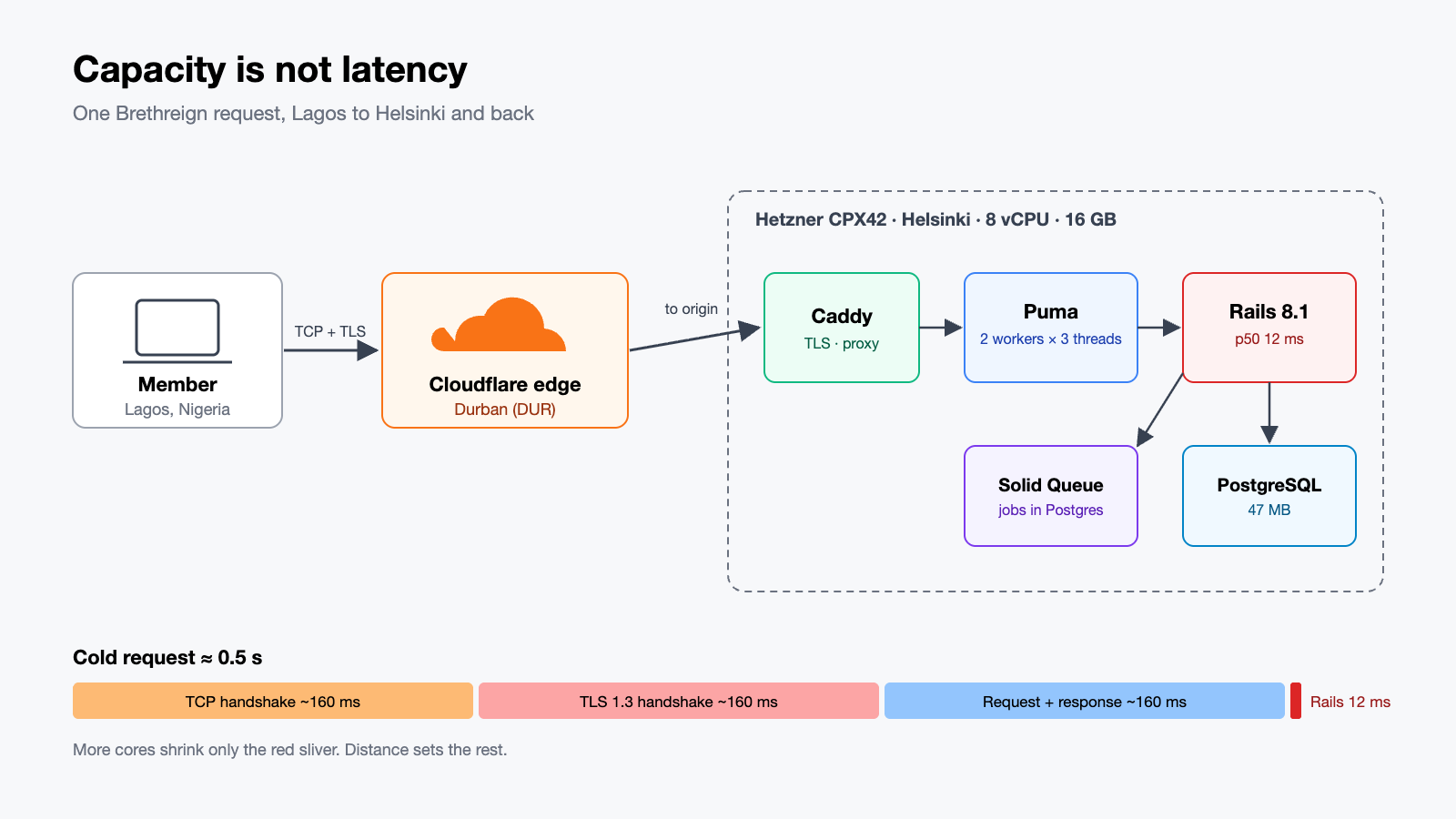
The member's wait was much longer. Measured from Nigeria, time to first byte was about 0.25 s when the browser already had a connection open, and about 0.5 s when it had to open a new one. Rails accounts for roughly 0.01 s of that. The rest was the network.
Where the time actually went
The round trip from Nigeria was about 162 ms. Two things made it worse than it needed to be.
Handshakes. A browser opening a fresh HTTPS connection over TCP needs one round trip for the TCP handshake and one for the TLS 1.3 handshake before it can even send the request. The request itself is a third. Three round trips at around 160 ms each is almost exactly the 0.5 s I measured on a cold connection. On a warm connection only the request trip remains, which matches the 0.25 s.
Routing. Cloudflare decides which of its data centres a visitor connects to. My traffic from Nigeria was landing in Durban, South Africa, rather than somewhere closer. From there, any request Cloudflare can't answer from its cache travels on to Helsinki and back. So a member in Lagos was effectively going south to go north.
Neither of these has anything to do with how many processors the server has. Capacity is how many requests the server can handle at once. Latency is how long one request takes to get there and back. I had bought capacity to fix latency.
What I changed instead
When every round trip costs 160 ms, the job is to remove round trips.
- Self-hosted the fonts. Brethreign uses Playfair Display and Inter. They were loading from Google Fonts, which means two extra origins:
fonts.googleapis.comfor the CSS andfonts.gstatic.comfor the files. Each one needs its own DNS lookup, TCP handshake and TLS handshake, and the font CSS blocks rendering. I subset the fonts to WOFF2, serve them from my own domain over the connection the browser already has open, and preload the two weights that appear first (Inter 400 and Playfair 700) with<link rel="preload">. - Checked HTTP/3. It was already on in Cloudflare. HTTP/3 runs over QUIC, which combines the transport and TLS handshakes into a single round trip, and can resume a recent connection with zero. On mobile networks that is the cheapest win there is.
- Kept navigation on one connection. Turbo Drive swaps page bodies over the same connection instead of reloading the page, and the native apps reuse one web view. Most taps after the first page skip the handshakes entirely.
- Let the edge serve static files. CSS, JavaScript and fonts are fingerprinted by Propshaft, so they can be cached for a long time at Cloudflare's data centres instead of travelling from Finland.
Still on my list: fixing the Durban routing, and moving the server closer to West Africa. Each of those shortens every single trip, and no amount of extra hardware can.
What the server can carry for the mass invite
The upgrade wasn't wasted. It bought headroom, which is exactly what a mass invite needs.
Today Brethreign has 168 members, 81 active in the last week and 26 on a typical day. Those 26 people produced 4,912 requests in 24 hours, about 190 each, counting page views, presence pings and chat updates.
Puma runs 2 workers with 3 threads each, so Brethreign can work on 6 requests at the same moment, using about 750 MB of memory. With a 12 ms median and a slower tail, I estimate a sustained 30 to 50 requests per second. An active member sends roughly one request every 10 seconds, which gives:
| Measure | Estimate |
|---|---|
| People online at the same moment | 300 to 500 |
| Active members per day | 3,000 to 5,000 |
| Headroom over today | about 100 times |
These are estimates from real traffic, not a load test. Before the invite goes out I plan to:
- Raise Puma to 4 workers (
WEB_CONCURRENCY=4). That roughly doubles capacity for about 750 MB more memory, which the server has. - Give each app on the server its own share using systemd (
CPUWeightandMemoryMax), so a busy Sunday on BiblioRata can't slow Brethreign down. - Confirm database backups are running and restorable. One server is still a single point of failure.
- Run a real load test against a copy of the app.
- Plan to move Brethreign to its own server at around 2,000 active members a day.
Update: can it hold 2,000 people online at once?
After publishing this I asked the next question: what if 2,000 members are online at the same moment? To answer it I parsed 48 hours of production logs and ranked every endpoint by total server time, not just average.
What I expected: the background chatter would be the problem. Every open app sends a presence ping every 45 seconds and refreshes the "who's online" strip.
What the logs said: those were the cheapest requests in the app, 6 ms for the ping and 13 ms for the strip. The real cost was elsewhere:
| Finding | What it was | Fix |
|---|---|---|
| Feed averaged 167 queries | "Have I blocked this author?" ran once per post, "did I like this?" once per card, and each suggested member loaded their job title separately | One query per request for blocks, reuse the likes the feed already preloads, preload experiences. Live feed now runs 132 queries |
| Inbox 126 queries, a chat 150 | Every message asked separately whether it had photos, a voice note or files | Preload all three attachment types with the messages. Inbox went from 68 to 44 queries locally |
| Four pages "took 33 seconds" | One stall at the same second, during the server resize | Nothing to fix, but a reminder to read outliers by timestamp before blaming a page |
| Sending a message sometimes took 1.2 to 1.9 s | Only photo messages: Rails was uploading the photo to Cloudinary inside the request, about 1.1 s, while the sender waited | Next: browser-direct uploads to Cloudinary, so a request slot is never held for an upload |
| AI game rounds took 5 to 7 s | The question generator calls an AI API inside the request | Next: generate in a background job and stream the round in when it's ready |
The last two matter most for capacity. Puma has 6 request slots, and a request waiting on Cloudinary or an AI API holds one of them the whole time. Fifty people starting a game at once would queue everyone else behind them.
The honest answer for 2,000 online: not on today's setup. That load is roughly 150 to 200 requests per second. Today's ceiling is closer to 50. The path there is to move slow outside calls out of requests, cut the average request time, run more Puma workers, put a connection pooler in front of PostgreSQL (it allows 100 connections shared by 11 apps), and prove it with a load test. Then, at that size, give Brethreign its own server.
What I learned
- Measure before you buy. Check load average, free memory and server-side response times first. If they're low, more hardware won't help.
- Measure from where your users are. Time to first byte from Lagos tells a different story from a dashboard in Europe.
- Count round trips, not just bytes. Every extra origin (a font host, a script, a tracker) costs a DNS lookup and two handshakes. Over 160 ms links, that's a visible delay.
- Upgrade for growth, not for speed. More cores are the right answer when the server is busy. They're the wrong answer when the wait is distance.
- Know your numbers before you invite the crowd. I now know roughly how many people Brethreign can hold, and what to change when it gets close.
If you're building something for believers and want to support Brethreign as it opens to more people, through giving, a grant or investment, I'd love to hear from you.
Leave a comment