Part 1 of 5 in the series **Musings from a lean stack: notes from building and running software alone, on one server and a small budget.
I build and run a handful of products on my own, on one server, on a budget that wouldn't cover a single engineer's laptop at a big company. This series is a set of notes from that life: what broke, what I changed, and what I'd tell someone starting out with the same constraints.
The first lesson is the least glamorous one, and it changed my week more than any feature I shipped.
The problem: a fix that took two hours to arrive
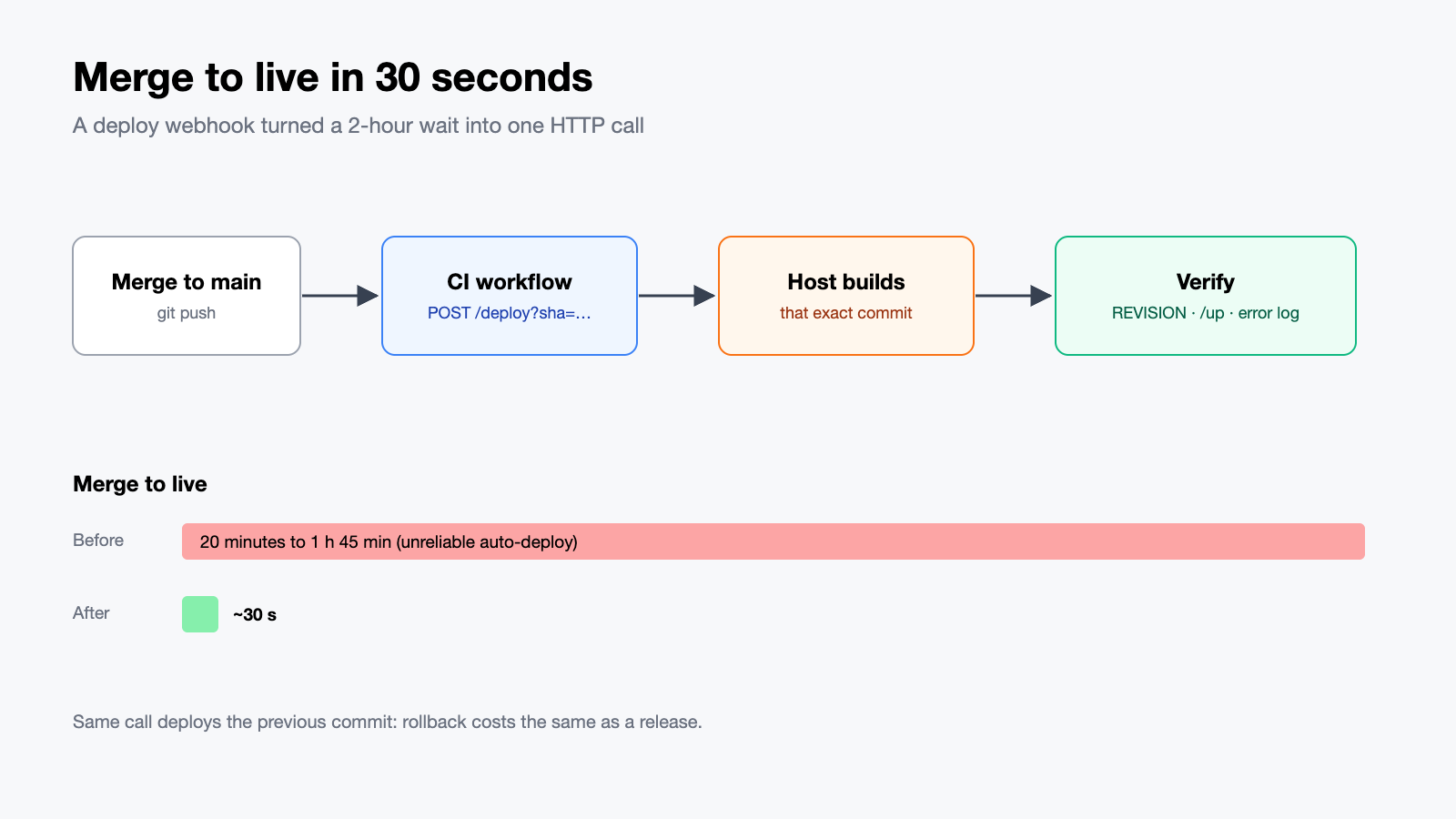
One of my apps is used by churches during live services. A tester reported that pressing "Next" at the end of a Bible chapter didn't move on to the next chapter. The fix took about an hour to write and test. Getting it onto the live site took another hour and forty-five minutes.
Nothing was wrong with the code. My hosting dashboard was supposed to deploy automatically when I merged to main, but the trigger was unreliable. Sometimes it fired in a minute, sometimes in twenty, sometimes not at all until I clicked a button. I had stopped noticing, because I'd gotten used to it.
That's the dangerous part. A slow deploy doesn't feel like an outage. It feels like friction, and you adapt to friction until it shapes everything:
- You batch fixes together "to save a deploy", so each release is bigger and riskier.
- You stop doing small cleanups, because they aren't worth the wait.
- When something breaks in production, your rollback is just as slow as your release.
- People reporting bugs wait hours to see a fix, and they notice.
The fix: make deploys a single HTTP call
Most hosting platforms, including the one I use, expose a deploy webhook: a URL that starts a deploy of a given commit when you send it a POST request. Once I had that, deploying became one line, and I could trigger it from wherever the merge happens.
Here's the shape of it as a GitHub Actions workflow. This is an illustration, not my exact file:
name: Deploy
on:
  push:
    branches: [ main ]

concurrency:
  group: deploy-production
  cancel-in-progress: false

jobs:
  deploy:
    runs-on: ubuntu-latest
    steps:
      - name: Ask the host to deploy this commit
        env:
          DEPLOY_KEY: ${{ secrets.DEPLOY_KEY }}
        run: |
          code=$(curl -sS -o out.json -w "%{http_code}" -X POST \
            "https://host.example/webhooks/deploy/${DEPLOY_KEY}?sha=${GITHUB_SHA}")
          echo "Host answered $code: $(cat out.json)"
          [ "$code" = "200" ]
A few details matter more than they look:
- Deploy the exact commit, not "latest". If two merges land close together,
?sha=makes sure each run deploys what it was triggered for. - Serialise deploys. The
concurrencygroup stops two deploys racing each other. - Fail loudly. If the host doesn't answer
200, the job goes red and I see it. - Treat the key as a secret. It can deploy anything to production. It lives in the repository's secrets, never in the file.
What changed
The next fix went from merge to live in about thirty seconds. Then the next one, and the one after that. In one afternoon I shipped five separate improvements to that app as five small releases instead of one big one, and each was easy to check on its own.
The real benefit wasn't speed for its own sake. It was that the size of each change went down. Small changes are easier to review, easier to test, and when one goes wrong, you know exactly which one it was.
Close the loop: check that the deploy actually happened
A deploy request is not a deployment. I now check that the server is really running the commit I meant to ship. My host writes the deployed commit to a file on the server, so a tiny script can wait for it:
want="$(git rev-parse origin/main)"
for i in $(seq 1 60); do
  live="$(ssh deploy@my-server 'cat ~/app/current/REVISION')"
  [ "$live" = "$want" ] && { echo "live after ~$((i * 5))s"; break; }
  sleep 5
done
curl -fsS -o /dev/null https://example.com/up && echo "site is up"
Then I look at the error log for the minutes after the deploy. If the error count jumps, I deploy the previous commit with the same webhook, which also takes thirty seconds. A fast deploy is also a fast rollback.
Lessons
- Measure your merge-to-live time. If you don't know the number, it's probably worse than you think.
- A slow pipeline makes your releases bigger. Bigger releases are riskier. Speed buys you smaller, safer changes.
- Rollback should cost the same as a release. If going back is slow, you'll hesitate when it matters most.
- Verify, don't assume. Check the running commit and the error log after every deploy.
On a small team, the deploy pipeline is the cheapest piece of leverage you have. Mine cost nothing but an afternoon.
Leave a comment